
Migrate Your Existing Excel Data Into a Custom Web Application

Most growing businesses have one file that quietly runs everything. It may be called `Master.xlsx`, `Final_Final.xlsx`, or something only one team member understands. It holds customer records, order history, stock details, staff work logs, invoices, follow-ups, approvals, and years of business knowledge.
So when a business decides to move from Excel to new software, the first question is practical:
Can all this existing Excel data be moved safely into the new system?
Yes. Genxa can help migrate your current Excel data into a custom web application, provided the data is reviewed, cleaned, mapped, and imported with care. The goal is not just to “upload a spreadsheet”. The goal is to turn scattered sheets into a reliable system that your team can use every day.
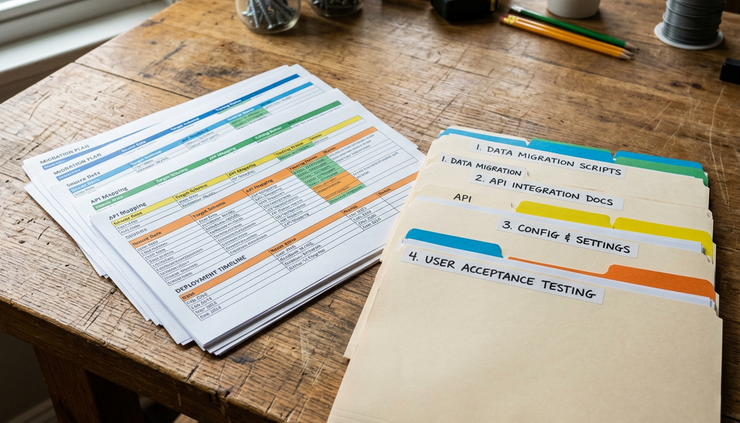
Why Excel becomes hard to manage as the business grows
Excel is useful. It is flexible, familiar, and quick to start with. Many businesses use it because it solves an immediate problem without waiting for software development.
A small team can manage leads, jobs, payments, stock, attendance, or service requests in spreadsheets. At first, it works well.
Then the business grows.
More people edit the same file. Multiple versions appear. Columns are renamed. Some cells have formulas, some have manual values, and some are blank because “everyone knows what that means”. A team member may add a new sheet for a new process. Another person may keep a local copy. Over time, the file becomes both valuable and risky.
Common problems include:
Duplicate customer entries with slightly different names
Missing mobile numbers, GST numbers, addresses, or dates
Manual approval steps that are hard to track
Formula errors that go unnoticed
No clear access control
Difficulty finding the latest version
Slow reporting when data is spread across many files
Dependence on one or two people who understand the sheet
Excel does not fail because it is bad. It fails because the business has outgrown the way the data is being handled.
A custom web application gives the same data a better structure. It can add logins, role-based access, automated checks, workflows, dashboards, reminders, reports, and audit history. More importantly, it can match the way the business actually works.
That is where Genxa’s role as a custom web application development service provider becomes useful. The team can study the current Excel setup, understand the business process behind it, and build software that carries forward the existing data instead of forcing the business to start again.
Can Genxa move your Excel data into the new software?
Yes, in most cases Genxa can move your Excel data into a new custom web application.
The process starts by understanding what is inside the Excel files. A spreadsheet is rarely just rows and columns. It often contains business rules, approval habits, naming patterns, calculations, and shortcuts built over many years.
For example, one sheet may track enquiries. Another may track follow-ups. A third may hold invoices. A fourth may list products. The new software must know how these relate to each other.
Genxa usually looks at questions such as:
What data must be migrated?
Which sheets are active and which are old references?
Are there duplicate records?
Which columns are mandatory?
Which values need correction before import?
How should old categories map to new software fields?
Which formulas should become software logic?
Which reports must match the old Excel reports?
Who should be able to view, edit, approve, or export data?
This matters because migration is not only a technical task. It is also a business decision.
If the Excel file has 10 years of sales history, it may not make sense to migrate every column into daily-use screens. Some data can be moved into an archive section. Some data may be needed only for reports. Some may no longer be useful.
A good migration plan protects what matters and avoids carrying old problems into new software.
The best Excel migration does not copy chaos into a new system. It turns useful business data into a clean, structured, searchable application.
How Genxa prepares Excel data for migration
Data migration works best when it follows a clear path. Genxa can help plan the move in stages so the final software feels reliable from day one.
The data is reviewed before development
Before building the application, Genxa studies the Excel files and the business process behind them. This helps the team understand what the software must support.
For example, a manufacturer may use Excel to track raw material purchase, production batches, stock movement, dispatch, and pending payments. A service business may use it for leads, site visits, quotations, job status, and renewals.
Both may use Excel, but the software design will be different.
This review helps define:
Modules needed in the application
Database structure
User roles
Required reports
Import rules
Validation checks
Links between records
A Custom web application should reflect the business process, not force every company into the same template. Genxa’s approach focuses on software that is built for the workflow, rather than a Template free website that only displays information without handling daily operations.
The data is cleaned before import
Excel files often contain data that humans understand but software cannot process correctly.
For example:
Excel entry | Possible issue |
`Mumbai`, `MUM`, `Bombay` | Same location written in different ways |
`Paid`, `paid`, `P` | Same status with different labels |
Blank date fields | Missing process history |
Customer name repeated twice | Duplicate record |
Phone number with spaces or symbols | Format mismatch |
Manual comments inside amount fields | Import error risk |
Cleaning may include removing duplicates, correcting formats, standardising names, separating combined fields, and marking incomplete records.
The idea is not to make the data look pretty. The idea is to make it usable inside the new application.
Excel columns are mapped to software fields
Every column in Excel needs a proper place in the new system.
For example:
Excel column | New software field |
Customer Name | Customer profile name |
Mobile | Primary contact number |
City | Billing or service location |
Enquiry Date | Lead creation date |
Status | Current workflow stage |
Assigned To | Team member responsible |
Remarks | Follow-up notes |
This mapping step prevents confusion during import. It also helps identify columns that should become dropdown values, date fields, number fields, checkboxes, file uploads, or linked records.
If a spreadsheet uses colour coding, comments, or formulas, those details need discussion too. A red row may mean urgent follow-up. A yellow cell may mean pending approval. A formula may calculate outstanding balance. In the new application, these can become status labels, alerts, or automated calculations.
Sample migration is tested before the final import
Genxa can run a sample import before moving all records. This is a safe way to check whether the data appears correctly in the application.
A sample migration helps detect issues such as:
Wrong date format
Missing mandatory fields
Duplicate records
Broken relationships between tables
Incorrect totals
Special characters causing errors
Fields that need better validation
After the sample test, the import rules can be adjusted. Once the business confirms that the sample data looks right, the full migration can be planned.

What types of Excel data can be migrated?
The exact scope depends on the condition of the files and the design of the new application. In general, Genxa can help move many types of Excel-based business data.
This may include:
Customer and vendor records
Product or service lists
Stock and inventory data
Sales enquiries and lead history
Quotations and invoices
Purchase records
Payment status
Employee or attendance logs
Service requests and job cards
Project tracking sheets
Follow-up remarks
Branch-wise or location-wise records
Old reports used for reference
Some data may need special handling. For example, if Excel contains file paths to scanned documents, the migration plan must decide whether those documents should be uploaded into the new system. If Excel contains formulas, the team must decide whether to migrate calculated values, rebuild the formula as application logic, or both.
If the file contains sensitive information, access control becomes important. A web application can restrict who sees financial data, customer contact details, staff information, or approval history. This is a major improvement over shared spreadsheets.
What happens to formulas, macros, and reports?
Many businesses worry that they will lose the calculations they depend on in Excel. The good news is that many spreadsheet behaviours can be rebuilt in the new application.
Formulas can become application rules
If Excel calculates totals, discounts, taxes, ageing, commissions, pending balances, due dates, or stock levels, those formulas can often become built-in software logic.
This reduces manual work. It also lowers the risk of someone accidentally editing a formula cell.
Macros may need redesign
Excel macros are often created to save time. They may generate reports, format sheets, update values, or move data between tabs.
In a custom web application, macros are usually not copied as they are. Instead, Genxa can understand what the macro does and rebuild the same task as a button, workflow, scheduled action, or report.
For example, a macro that prepares a monthly outstanding report can become a report screen with filters for date, customer, branch, and payment status.
Reports can be improved
Excel reports are useful, but they often require manual filtering and formatting. In the new system, reports can be built with live data.
The application can support:
Daily, weekly, or monthly reports
Search and filter options
Export to Excel or PDF
Branch-wise reports
User-wise activity reports
Pending work reports
Payment and invoice summaries
Stock movement reports
This is where businesses start seeing a bigger benefit. The old Excel data is not just stored. It becomes easier to use.
Why a custom application is better than forcing the business into fixed software
Ready-made software can work well when the process is simple and standard. But many businesses in India run with specific rules, local workflows, approval habits, and reporting formats.
A distributor, training institute, clinic, manufacturer, logistics provider, repair service, real estate team, or field service company may each have a different way of working. Even two businesses in the same sector may not follow the same flow.
That is why custom development matters.
Genxa can design software around the actual process:
Who enters the data
Who checks it
Who approves it
When reminders must be sent
What reports matter
Which fields are compulsory
Which steps can be automated
Which records need history tracking
The aim is to Build around your process and Automate your business where it makes sense, without removing the practical checks your team depends on.
This also makes adoption easier. When the application matches familiar workflows, the team does not feel like everything has changed overnight. The screens can use known terms, familiar status names, and reports similar to the ones already used in Excel.
What Genxa needs from you for a smooth migration
A successful Excel migration needs cooperation from both sides. Genxa can handle the technical planning and development, but the business must help explain the meaning of the data.
Before the project starts, it helps to prepare:
The latest version of all Excel files
A list of sheets that are still active
Sample reports you currently use
Details of formulas that matter
Known data issues
User roles and access needs
A list of must-have screens
A list of old data that should be archived
Any compliance or privacy needs
It also helps to identify one key person from the business who understands the Excel files well. This person can confirm field meanings, old status labels, and exceptions.
For example, if a column says `Hold`, Genxa needs to know what it means. Does it mean payment pending, customer not responding, stock unavailable, or management approval required? Software needs clear rules.
The better the inputs, the cleaner the migration.
How the migration reduces daily manual work
Moving from Excel to a custom web application is not only about storage. It changes how daily work happens.
Instead of manually checking multiple sheets, the team can work from one system. Users can log in, update records, upload files, check pending tasks, and generate reports without searching through different versions of a spreadsheet.
A manager can see pending approvals. A sales team can check follow-ups. A stock team can record movement. An accounts team can track payments. Each user sees what they need, based on their role.
This can reduce repeated data entry. It can also reduce phone calls asking for status updates, because the information is already available in the system.
A well-built application can also add validations. For example, it can stop users from saving a record without a mobile number, invoice date, or customer name. It can prevent duplicate entries. It can maintain change history. It can show alerts when work is overdue.
These are small changes, but they add up.
What to expect after the data is moved
After migration, Genxa can help verify that the data has landed correctly. This may include checking record counts, comparing sample reports, reviewing key customer records, and testing search and filters.
The first few days after launch are important. Teams may notice small differences between how they used Excel and how the new system works. Some fields may need renaming. Some reports may need minor adjustments. Some users may need guidance.
This is normal.
A custom application grows stronger after real users start working with it. The main goal is to launch with clean data, clear workflows, and reliable core features. After that, improvements can be planned based on actual use.
The clear answer
Yes, Genxa can migrate your existing Excel data into a custom web application. The safest approach is to review the files, clean the data, map fields correctly, test a sample import, and then move the final records into the new system.
Excel may have helped the business start and grow. A custom web application can help it work with more control, better visibility, and fewer manual errors.
The key is not to treat migration as a one-time upload. Treat it as a chance to organise years of business knowledge into software that supports the next stage of growth.


Comments